
Delete Quotes
For Sage 300
Delete Quotes deletes thousands of old quotes and speeds up day-end.
What is Delete Quotes?
In many businesses, once a certain period of time has passed, the quotes have expired and will never become active orders, or those quotes that have become active orders can be removed. Deleting Quotes individually can be a time consuming task.
Delete Quotes eliminates the time-consuming steps involved in deleting old Order Entry quotes from the Sage 300 Order Entry module.
Important Note: Delete Quotes uses Sage 300 objects to delete quotes safely. If Sage 300 Order Entry will not delete a quote, neither will Delete Quotes.
Delete Quotes Features:
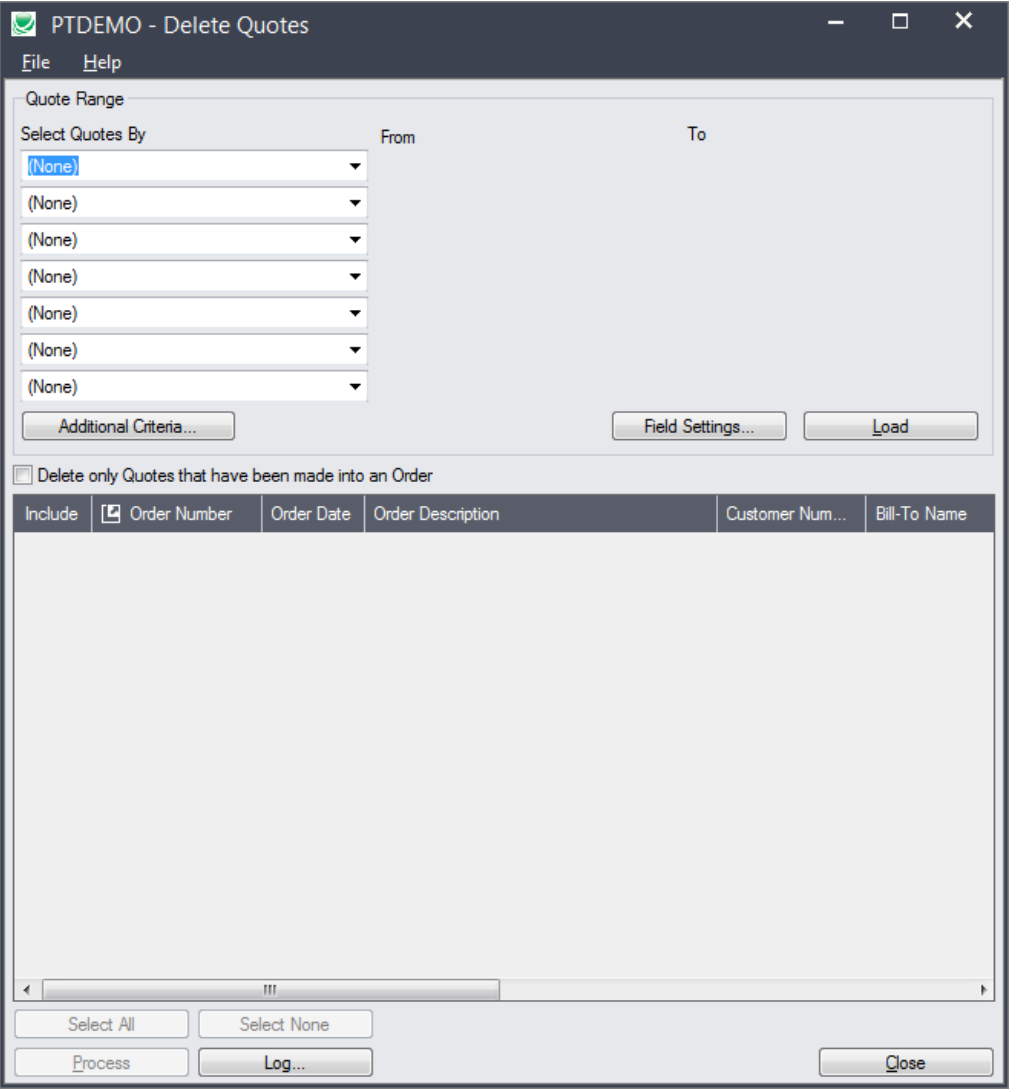
Select ranges of quotes by order number, order date, customer number, and by any optional fields assigned to quotes and orders in OE – or import a list of the quotes that you need to delete.
Specify additional criteria using order fields.
Optionally, select only quotes that have been made into orders.
Load the list of selected quotes and further “cherry-pick” ones for deletion.
Check quote details while finalizing the deletion list.
Press a Process button to complete the operation for all selected quotes in one step.
Optionally delete quotes individually by selecting from the loaded list and pressing the Delete key
View a log of all deletions after processing.