Create and maintain the rules for copying accounts with the Copy GL Accounts Setup program.
Once the rules are set up, you can add or change accounts in the template company and copy those accounts to all target companies in a single operation.
Copy GL Accounts manages multi company ledgers with segment filtering and substitution rules.
Productivity Tools Enterprise manages the setup and copying operations needed to support a multicompany general ledger. Segment filtering and substitution rules are defined per target company and stored in a template company’s database. Based on those rules, you can add new accounts to all target companies in a single step.
Account copying rules are very flexible, letting you specify different ranges of accounts for each target company, substitute account segment codes in target companies, and exclude any number of accounts. Copied account information also includes the optional field lists from the source account, the members of rollup accounts, account allocation information, and multicurrency information if copying between multicurrency ledgers. You can create and maintain the rules for copying accounts with the Copy GL Accounts Setup program.
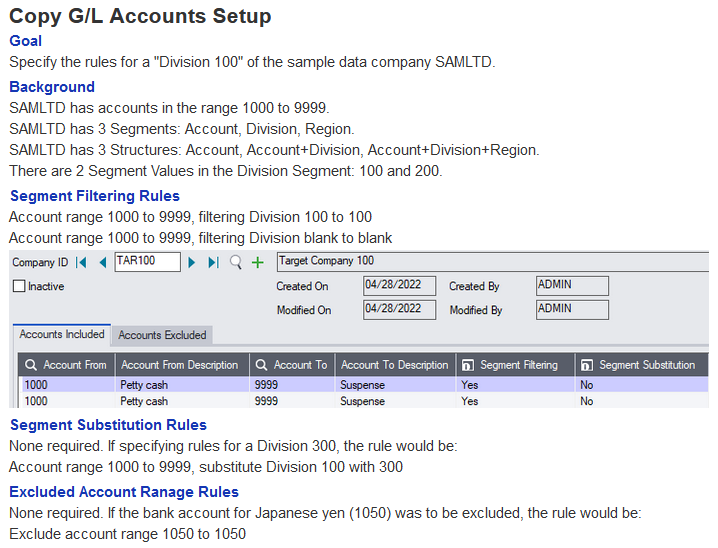
Copy GL Accounts Setup
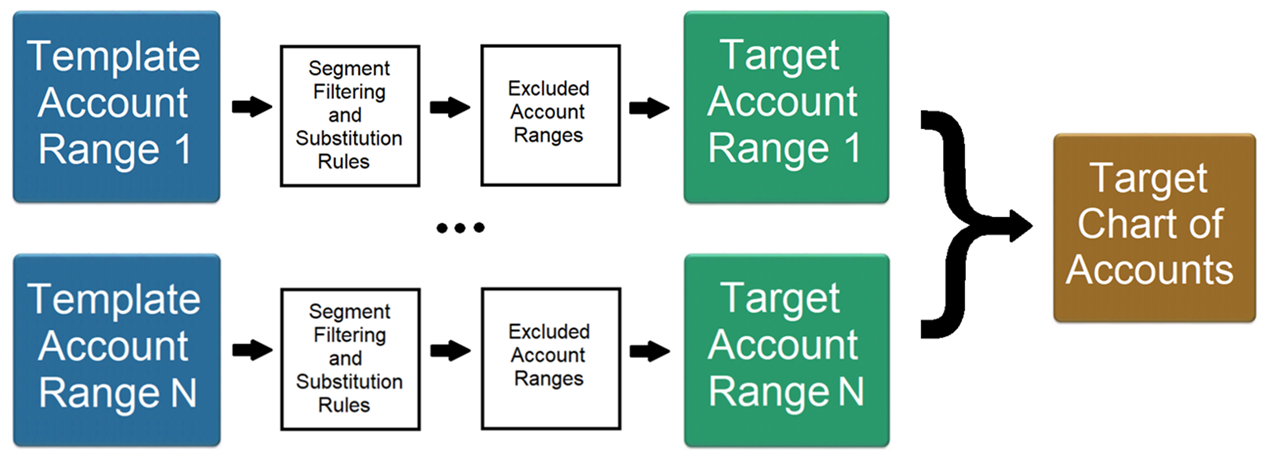
Specify any number of account ranges from a template company to target companies. For each account range: specify any number of segment filtering rules and any number of segment substitution rules. For all account ranges: specify any number of excluded account ranges.
Use the Copy GL Accounts Setup program to:
Set up the rules for copying accounts and substituting account segment codes.
This means that you don’t have to reselect items again using the range fields – especially useful if you manually edited the previous list of items.