Sage 300 Document Management
Attach Documents inside for Sage 300
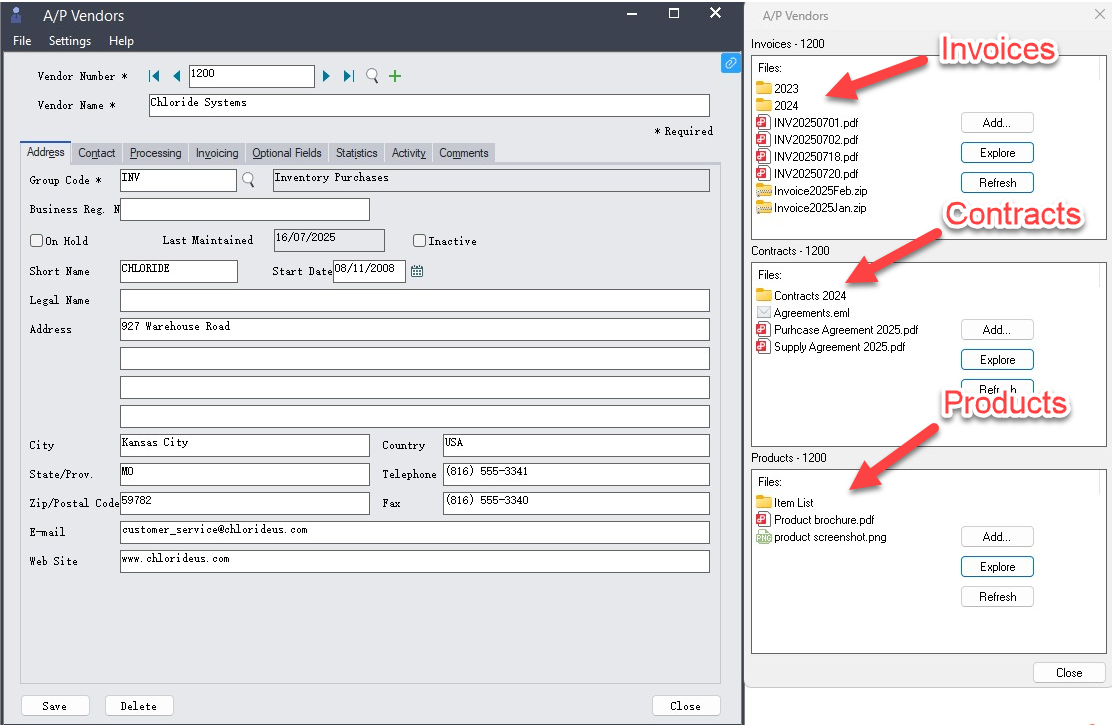
Sage 300 Norming Document Management solution lets users attach documents inside of Sage 300 such as PDFs, Word files, Excel spreadsheets, and scanned images. It allows you to attach it to the Sage 300 transaction screens.
This includes modules like General Ledger, Accounts Payable, Accounts Receivable, Purchase Orders, Order Entry, Inventory Control, Project & Job Costing, and more.
Key Benefits for Finance and Operational Teams
- Attach files to any transaction in Sage 300 desktop screen – AR, AP, OE, PO, IC, GL, PJC, and more.
- Digitize and centralize all supporting documents. Simplify audits with a complete, accessible audit trail.
- Make documents accessible to relevant users across departments, improving response time and accountability
Sage 300 Document Management Examples
- Purchase Request: Attach supporting documentation to purchase requests, such as item specifications, pictures, warranty information and etc.
- Expenses: Any receipts can be uploaded by employees and viewed by the finance users.
- Timesheets : Supporting documents such as work orders, sick notes.
- A/P Invoice Request: Link vendor invoices, receipts, or purchase order to payables transactions.
- Sales Quote Request: Attach quotations, customer correspondence directly to the order.