
Audit Logger
For Sage 300
Easy Configuration
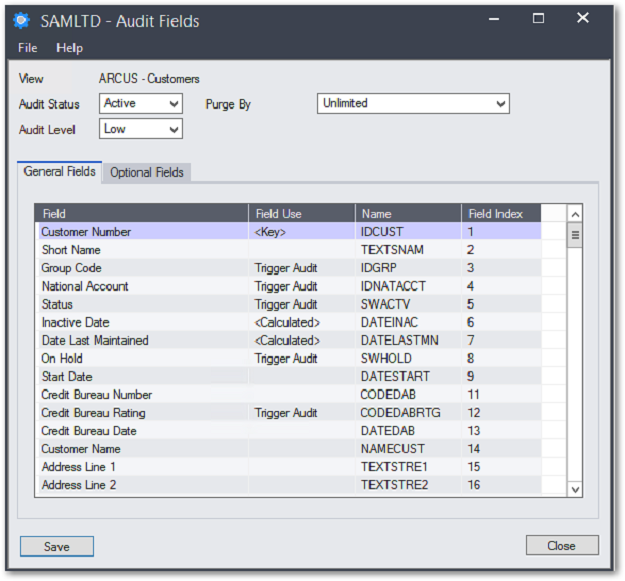
An administrator can tailor each individual view, setting the views audited fields and the views audited optional fields to meet their specific requirements. Alternatively an administrator can quickly use the predefined minimum & maximum setting that can be applied by module or by view.
A finalized configuration can be exported and quickly imported into many companies to reduce the configuration time and ensure consistency in a multi-entity deployment.
The auditing of Inventory Control, Purchase Orders & Order Entry modules is enhanced to include the Lot Tracking & Serialized Inventory functionality that is now fundamental to the distribution modules.
Reporting
Reporting can be filtered by view, user or date range and can be limited to just fields that have been changed in the audit. Audit data can also be exported using standard Sage 300 export functionality, then mined using Excel or Access or more sophisticated applications of the customer’s preference.
Main Features
- Captures both before and after details of the audited fields
- For user actions, logs the parameters and values the processing view was called with
- Logs authenticated Windows user name, login domain and IP address from the workstation where the change occurred
- Ignores statistical updates performed by internal posting procedures, a significant performance design feature
- Dynamically handle module upgrades
Supports all Sage 300 databases
Availability & system requirements
Sage 300 Editions:
Standard, Advanced and Premium
Audited Modules:
- SM, AS, CS, BK, TX, UP, CP
- AUDIT LOGGER SETUP
- PURCHASING WORKFLOW SETUP
- GL SETUP + TRANSACTIONS
- AR SETUP + TRANSACTIONS
- AP SETUP + TRANSACTIONS
- IC SETUP + TRANSACTIONS
- OE SETUP + TRANSACTIONS
- PO SETUP + TRANSACTIONS
- PJC SETUP + TRANSACTIONS
- US & CANADIAN PAYROLLS