
Sage 300 Global Search Module Installation
Introduction
Global Search was introduced in Sage 300 2019, it was designed to provide easy search functions for commonly needed items. Search lists are filtered by requested criteria, items in lists are active links able to open associated screens. Global Search is designed to build an index of fields defined in db-data-config.xml file, this index allows quick reference information for desktop global search functions.
The following modules and functions are included in global search
- Accounts Payable: Vendors (APVEN), Invoices Headers (APIBH Table), Payments (APTCR), Adjustments (APTCP)
- Accounts Receivable: Customer (ARCUS), Invoice Header (ARIBH), Refund (ARRFH), Receipts (ARTCR), Adjustments (ARTCP)
- General Ledger: Accounts (GLAMF), Journal (GLJEH)
- Inventory: Items (ICITEM), Receipts (ICREEH), Shipments (ICSHEH), Internal Usage (ICICEH), Adjustments (ICADEH), Transfers (ICTREH)
- Order Entry: Orders (OEORDH), Shipment (OESHIH), Invoice (OEINVH), Credit/Debit (OECRDH)
- Purchase Order: Requisition (PORQNH1), Purchase (POPORH1), Receipts (PORCPH1), Invoices (POINVH1), Returns (PORETH1), Credit/Debit (POCRNH1)
Global Search Environment
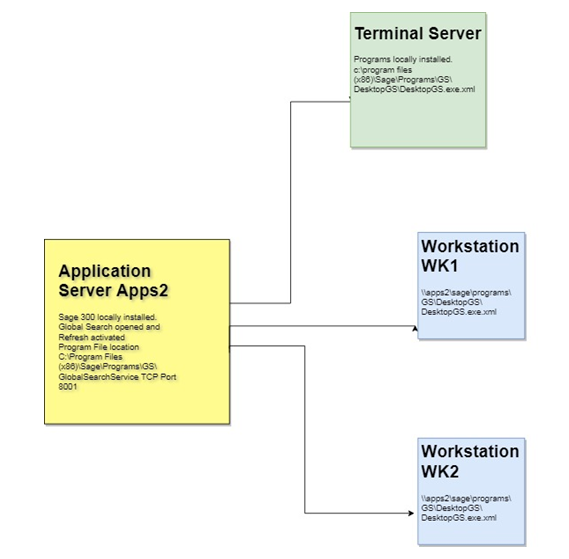
Global search is installed on a Sage 300 applications server, this installation is comprised of a service (GlobalSearchService), and a data index location (\GS\solr-7.2.1\sage300\<Database ID>). Searches are made available to client stations through a TCP port 8001, desktops interact with this port and make requests.
A port for administration is also used, TCP port 8984. At this time, administration functions are only available to development.
Steps to activate Global Search
- Install Global Search on Sage 300 Application Server.
- If Firewall is active on server, open ports 8001 and 8984.
- On Application server login to Sage 300 Company as Sage Admin user.
- Open Global Search from icon on top menu, when screen opens select Refresh.
- Refresh button will build the index, no feedback is present during the index build and refresh button only needs to activated once.
- Global search is created for each Sage 300 database, refresh button would need to be activated for each, and every Sage 300 company.
- Global search would not be installed on workstations, workstation setup does not install global search by default. Workstations installed with programs locally have the possibility to install global search service, but this module should not be installed locally and should use global service on application server.
- On Workstations with local install, modify DesktopGS.exe.xml file to use server name instead of localhost. This file is located by default at C:\Program Files (x86)\Sage\Sage300ERP\GS\DesktopGS
- Modify key on line 5 change localhost to <server name> <add key=”GlobalSearchEngineLocation” value=”https://<server name>:8001/GlobalSearch/WS” />
- Modify key on line 31 change localhost to <server name> <endpoint address=”https://<server name>:8001/GlobalSearch/WS” binding=”wsHttpBinding”
- For example if Sage 300 application server is apps2 then the changes are as follows:
- <add key=”GlobalSearchEngineLocation” value=”https://apps2:8001/GlobalSearch/WS” />
- <endpoint address=”https://apps2:8001/GlobalSearch/WS” binding=”wsHttpBinding”