
Sage 300 Invoice Shipment
Invoice Shipments eliminates time-consuming steps involved in invoicing shipments from Sage 300 Order Entry. It lets you select the set of shipments – or import a shipment list – and then click a button to create the invoices. The time savings are significant for businesses that want to create all invoices as an end-of day procedure.
What is Invoice Shipment?
For many businesses, shipping an order and invoicing the shipment is a two-step process. A shipment is created from an order, and once the order has shipped, an invoice is created. In Sage 300, this two-step process can be very time consuming as each shipment must be called up in the Order Entry Invoices application and then invoiced.
Invoice Shipments eliminates this process and invoices hundreds of shipments with many consolidation options.
A key feature – the ability to control the invoice date – is provided for businesses that ship at the end of a day and invoice the following day with the previous day’s date. In addition, it includes several options for consolidating invoices for shipments.
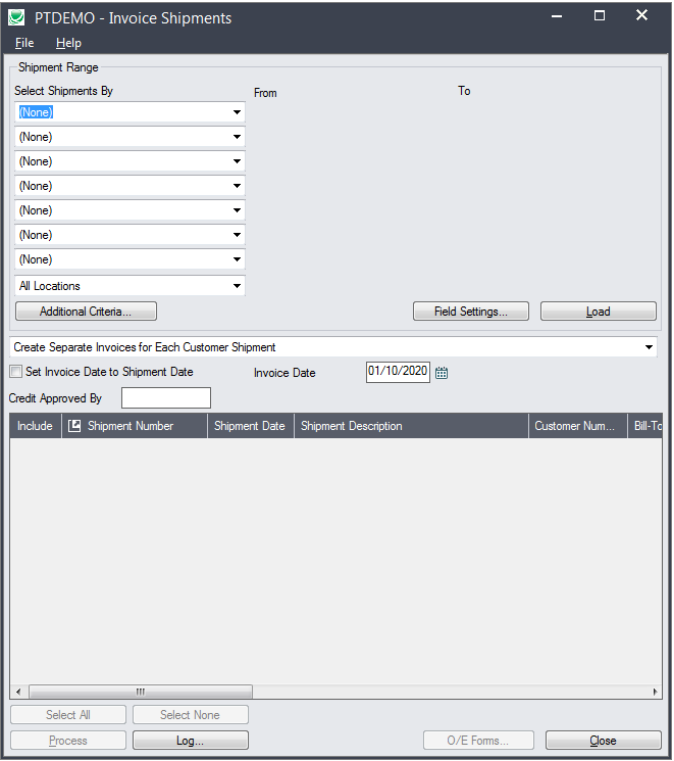
Invoice Shipments Features
- Select shipments by specifying ranges such as shipment numbers, shipment dates, customer numbers, and optional fields used in shipments – or import a list of shipments for invoicing. Range selection uses the same mechanisms used by core modules when printing reports.
- Filter invoicing by location.
- Create invoices for shipments as follows:
- Create separate invoices for each customer shipment
- Create one invoice for each customer, for all customer’s shipments
- Create one invoice for each customer, for all customer’s shipments on the same shipment date
- Create one invoice for each customer, for all customer’s shipments with the same order number
- Set the invoice date to the shipment date or specify the date for all invoices.
- Enter the name and password of a user with the rights to override credit limits if invoicing shipments that would cause a customer to go beyond their credit limit.
- After selection, review the list of shipments and cherry-pick ones for invoicing.
- Click the Process button to complete the operation in one step.
- Quickly print a number of order-related forms, without navigating to another window.