
Apply Documents
For Sage 300
Apply Documents saves time matching many Sage 300 Accounts Receivable payment documents to AR Invoices.

What is TaiRox Apply Documents?
TaiRox’s Apply Documents matches and applies payment documents to invoices. It provides a payment grid and matching invoice grid to maximize visibility. Apply Documents supports manual and auto-apply operations.
How does it work?
- Matching can be done from the perspective of a payment document or from the perspective of an invoice.
- The auto-apply matching feature includes an option to exclude selected documents or invoices.
- Payments from a national account customer can be applied to any of its member customers.
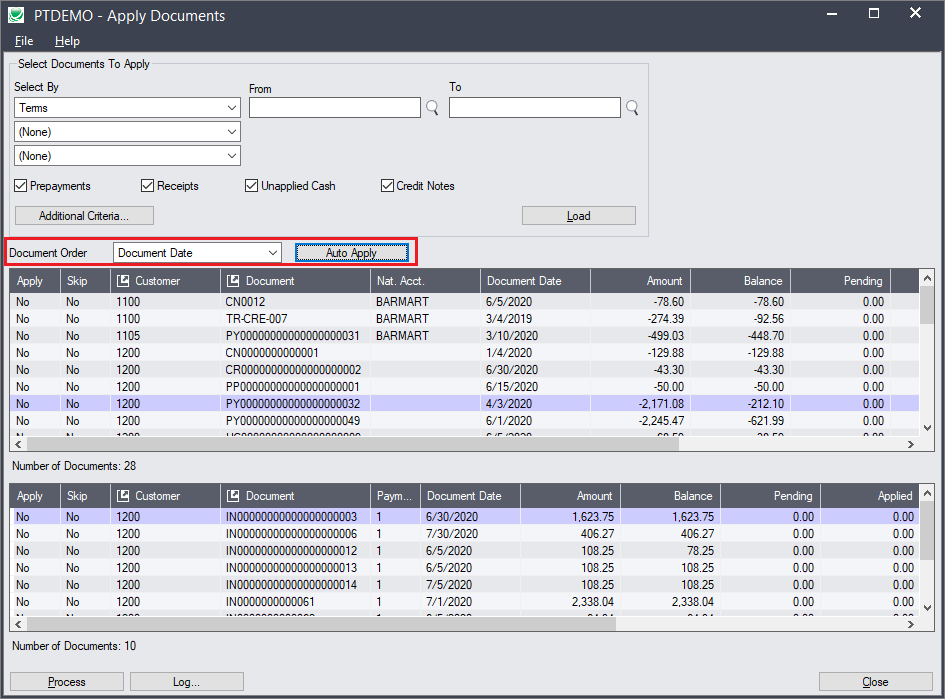
Apply Documents Features
Apply Documents is easy to understand in a situation where, for example, 300 invoices are sent out and 290 checks for these invoices are received and deposited – and now need to be applied. You can apply documents easily to both open item and balance forward customer accounts.

- Select documents to apply by customer number, document number, national account, document date, discount grace period or due date grace period.
- Specify document types – prepayments, receipts, unapplied cash, and/or credit notes
- Specify additional criteria for document selection if applicable.
- Choose the order for listing and applying documents – by document number, document date, or due date.
- Click the Load button to display filtered apply-from documents in one grid, and invoices for the selected “apply-from” document customer in a second grid.
- Use Auto-Apply to match all displayed “apply-from” documents to their corresponding “apply-to” invoices.
- Review and optionally override matched amounts before processing.
- The grid displays Order number and PO number columns and lets you drill down to customer details, document details, and OE orders.