No Tax on Qualified Overtime Compensation in Sage 100
Summary
One Big Beautiful Bill Act – Federal Tax Only
No Federal withholding tax on Qualified portion of Overtime Compensation – OBBBA
Effective Tax years 2025 through 2028.
Resolution
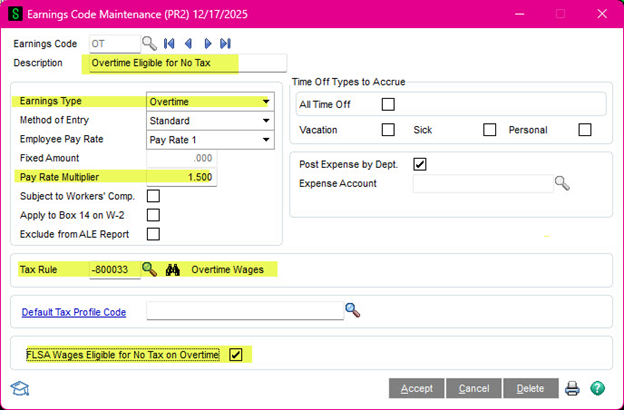
For Tax Year 2026 – Requirements Setup an Overtime Earnings Code
New field “FLSA Wages Eligiblefor No Tax on Overtime” checkbox.
Field enabled when Earnings type is Overtime.
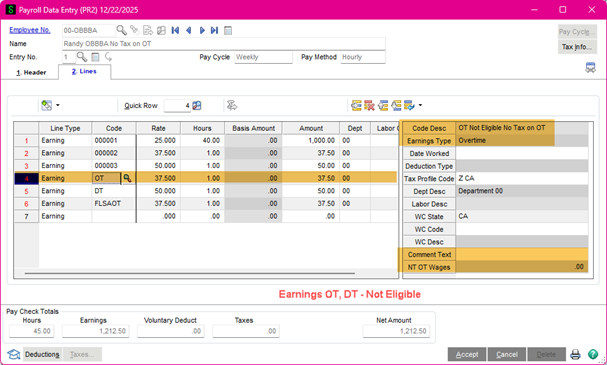
For non-Qualified Overtime, an additional Earnings Code, Overtime Earnings Type, will be needed without the “FLSA Wages Eligible for No Tax on Overtime” selected.
Any Overtime Tax Rules can be used that are subject to Federal Income Tax Withholding – EXCEPT 800151 (DO NOT USE).
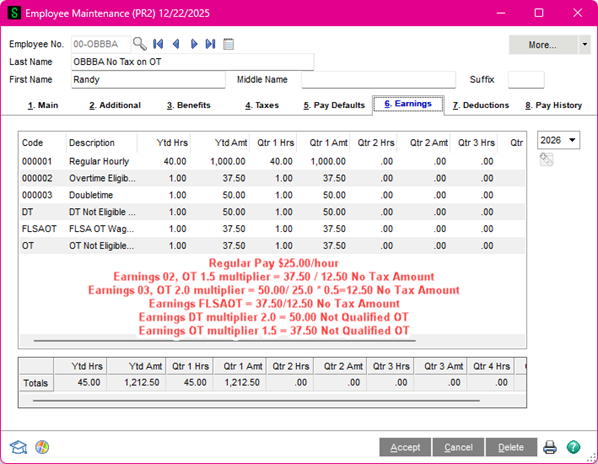
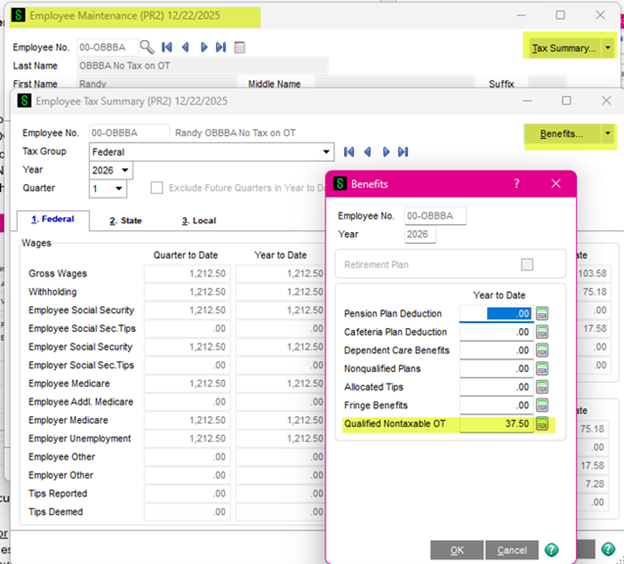
Year-to-date Qualified Nontaxable OT will accumulate to the Employee Maintenance, Tax Summary, Benefits tab, which populates the W-2.
If PR 2.26.0 is installed and set up prior to updating ANY Qualified Nontaxable OT, the amount is calculated during normal payroll processing and updated.
If PR 2.26.0 is installed after ANY Qualified Nontaxable OT is Updated, manual calculations will need to be entered in Benefits tab to bring up to date.
The amount is 0.5 of the Premium on Overtime Amount.
For example, If Total Eligible Overtime is $15,000 for the year, the Qualified Non-Taxable Overtime is $5,000 deduction.
The total overtime for the year-to-date can be calculated from the Earnings Tab in Employee Maintenance.
Payroll Data Entry – Tax Year 2025 (not used)
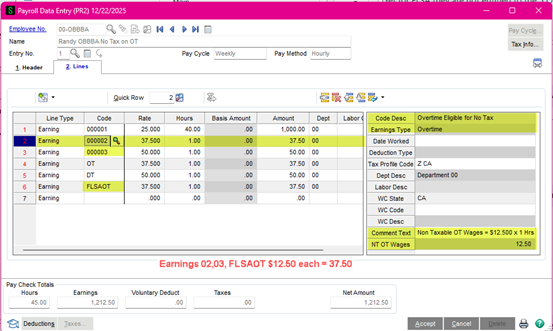
Pay Cycles starting with 1/1/2026 will calculate the Qualified No Tax on Overtime portion.
Check dates prior to 1/1/2026 in the Pay Cycle will not calculate the Qualified Tax portion. Modifying the pay cycle date will not correct the entries. Check must be deleted & reentered with the correct pay cycle.
The Secondary Grid for the Lines on Overtime Pay Type will display the Qualified Tax (1/2 of the Premium Amount) after leaving the line and returning to it. The Earnings code for Overtime must have the FLSA Wages Eligible for No Tax on Overtime selected.
Reach out to your tax accountant or the Department of Labor for additional information. https://www.dol.gov/agencies/whd/overtime
There is some non-Qualified Overtime and some states have different laws than the FLSA which do not apply.
The amount entered in the Benefit window under Qualified Nontaxable OT will display in the Preparer’s Grid for Box 12 with TT Code and print on the W-2, in Box 12 for Tax Year 2026.